A trucking compliance management workflow is a structured, continuous process that keeps your fleet aligned with FMCSA and DOT regulatory requirements at every stage of operations. The industry term for this practice is “transportation compliance management,” and it covers everything from driver qualification files to vehicle inspections, Hours of Service logs, and audit readiness. FMCSA civil penalties can reach $16,550 per violation per day, with repeat offenses climbing past $32,000. That is not a paperwork problem. That is a business survival problem. Manual compliance management consumes 20–40 hours monthly per fleet. Automation cuts that overhead to near zero.
A sound compliance workflow covers six core areas. Miss any one of them and you create an audit gap that FMCSA investigators will find.
Driver Qualification Files are the foundation of any transportation compliance process. Each file must include a commercial driver’s license, medical certificate, employment application, motor vehicle record, and road test results. The critical failure point is expiration tracking. A medical certificate that lapses by one day puts your driver out of compliance immediately.
Daily Vehicle Inspection Reports (DVIRs) must be completed before and after every trip. Maintenance records must document every repair tied to a DVIR defect. Fleets that automate DVIR collection through telematics reduce missed entries and create a continuous paper trail that holds up under scrutiny.

HOS monitoring is where Electronic Logging Devices (ELDs) earn their keep. ELD data feeds directly into your compliance records, capturing drive time, on-duty time, and rest periods in real time. This eliminates the falsification risk that paper logs carried for decades.
Every pre-employment, random, post-accident, and return-to-duty test result must be stored and retrievable. Many fleet managers treat this as a human resources function. It is a compliance function. Missing test records are a direct path to a conditional or unsatisfactory safety rating.
FMCSA investigators allow only 24–48 hours to produce complete, organized audit documents. That window is too short to compile records from scattered spreadsheets, email threads, and paper folders. Continuous audit readiness means your documents are organized and current every single day, not just when an investigator calls.
The table below summarizes each component and its compliance purpose:
| Component | Compliance purpose |
|---|---|
| Driver Qualification Files | Verify driver eligibility and license validity |
| DVIR records | Document vehicle condition before and after trips |
| HOS logs via ELD | Prove compliance with federal drive-time limits |
| Drug and alcohol testing | Confirm driver fitness under 49 CFR Part 382 |
| Audit-ready document packets | Respond to FMCSA requests within 24–48 hours |
Pro Tip: Set expiration alerts 60 days, 30 days, and 7 days before any document expires. Three-stage alerts give you time to act before a lapse becomes a violation.
The right fleet management software does not just store documents. It actively manages your compliance calendar, flags risks before they become violations, and generates audit packets on demand.
The core features to look for include:
Leading compliance workflow software automates document collection, expiration alerts, manager approvals, audit packaging, and multi-location visibility specifically for trucking. That combination replaces what used to require a full-time compliance coordinator.
The table below compares feature categories across different types of compliance tools:
| Feature category | Entry-level tools | Full compliance platforms |
|---|---|---|
| Document storage | Basic file upload | Structured DQF and maintenance folders |
| Expiration alerts | Manual reminders | Automated multi-stage alerts |
| HOS integration | None | Real-time ELD data sync |
| Audit packet generation | Manual assembly | One-click bundled export |
| Compliance dashboard | Single driver view | Multi-driver, multi-vehicle overview |
| Drug testing workflow | Not included | Integrated testing documentation |
The FMCSA Safety Measurement System evaluates carriers across 7 BASIC categories using inspection and crash data from the past 24 months. Your compliance software should map directly to those categories so you can see your risk profile before an investigator does.
Pro Tip: Verify that your compliance software updates its rule sets at least quarterly. FMCSA regulations change, and software that lags behind those changes will give you false confidence in your compliance status.
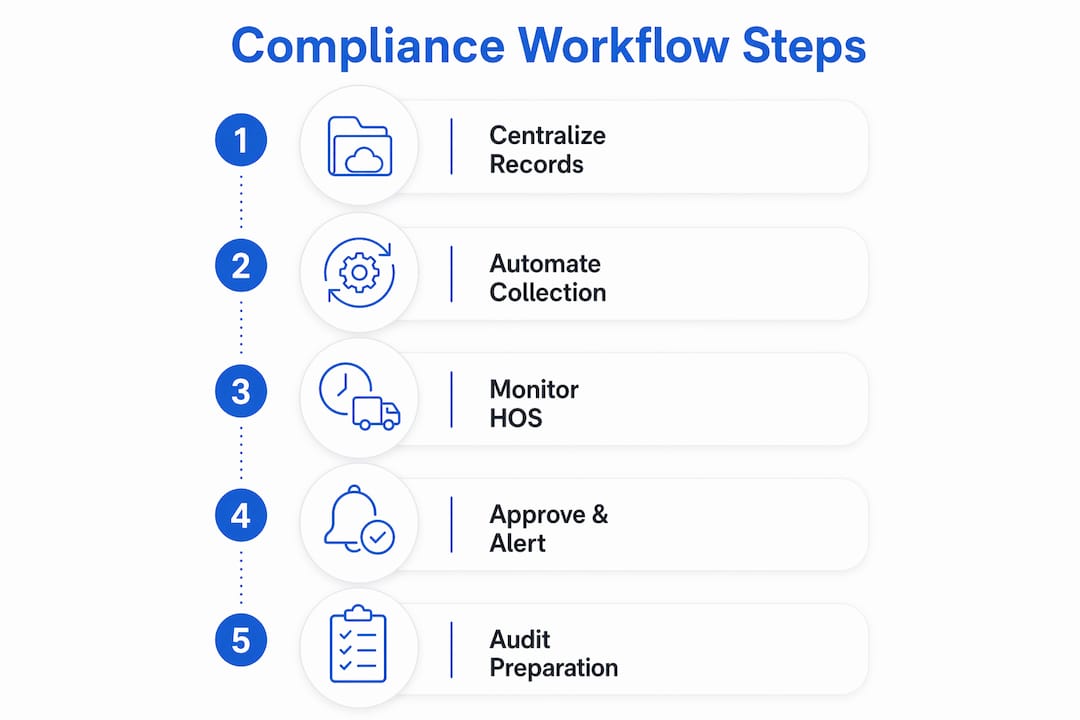
Building a logistics compliance workflow from scratch takes discipline, but the process is straightforward when you follow a clear sequence. Here are the five steps that work for small fleets.
Step 1: Centralize all records into one system. Move every driver file, inspection record, and test result into a single digital platform. Paper folders and email attachments are not a system. They are a liability. A central system gives every authorized team member access to the same current records.
Step 2: Set up automated document collection and expiration tracking. Configure your platform to collect documents at hire and trigger renewal workflows automatically. Every CDL, medical certificate, and annual review has a deadline. Your system should own those deadlines, not your memory.
Step 3: Connect your ELD for real-time HOS monitoring. Your ELD compliance data should feed directly into your compliance records without manual entry. Platforms that support existing hardware like PT-30 and IOSix devices let you connect without replacing equipment you already own.
Step 4: Automate approvals, alerts, and audit preparation. Set up workflow rules that route document renewals to the right manager for approval, flag overdue items on a compliance dashboard, and pre-build your audit packet structure. When FMCSA calls, you click one button instead of spending 48 hours scrambling.
Step 5: Train your team on compliance-by-design practices. Embedding compliance tasks directly into dispatch and daily operations creates a culture where compliance happens as work gets done, not as a separate administrative burden. Drivers complete DVIRs in the app before they pull out. Dispatchers see HOS availability before they assign loads.
Prerequisites before you start:
Pro Tip: Run a compliance gap audit before you build your workflow. List every document your fleet must maintain, then check which ones are current, which are expired, and which are missing entirely. That gap list becomes your implementation priority list.
Even well-intentioned fleets run into the same problems. Knowing what breaks down first helps you fix it before an auditor finds it.
The most common failure points are:
That last point deserves direct attention. ELDs manage Hours of Service but leave driver qualification files, drug testing records, and maintenance documentation entirely unmanaged. Many small carriers believe their ELD provider covers full compliance. It does not. You need a separate system or an all-in-one platform that connects all of those areas.
Small to mid-sized fleets running 6–50 power units carry complex documentation needs but rarely have a dedicated compliance coordinator. That gap increases audit risk significantly. Workflow automation fills the coordinator role without adding headroll.
Critical reminder: Attempting to compile audit documents only after an FMCSA request arrives is not a viable strategy. Investigators give you 24–48 hours. Continuous audit readiness is the only approach that works.
Proactive self-monitoring is the other major fix. Review your FMCSA Safety Measurement System data regularly, not just after you receive an enforcement letter. Carriers who monitor their BASIC scores monthly catch problems early and correct them before they trigger an investigation.
Pro Tip: Assign a specific person to review your SMS BASIC scores on the first Monday of every month. It takes 15 minutes and gives you a clear picture of where your fleet stands before any enforcement action begins.
A trucking compliance management workflow built on automation and centralized records is the only reliable way to stay audit-ready, avoid FMCSA penalties, and protect your operating authority.
| Point | Details |
|---|---|
| Centralize all records | Store every driver file, inspection record, and test result in one digital platform. |
| Automate expiration tracking | Set multi-stage alerts so no license or certificate lapses unnoticed. |
| Connect ELD data to compliance records | Real-time HOS sync eliminates manual entry and falsification risk. |
| ELDs do not cover full compliance | Drug testing and DQF management require separate systems or an all-in-one platform. |
| Maintain continuous audit readiness | FMCSA gives you only 24–48 hours to produce documents. Be ready every day. |
The fleets I see struggle most with compliance are not the ones that ignore the rules. They are the ones that think they are covered when they are not. An ELD on every truck feels like compliance. It is not. It is one piece of a much larger system.
The most expensive mistake I see repeatedly is the spreadsheet trap. A fleet manager builds a detailed Excel tracker for driver files, feels organized, and stops there. Then a medical certificate expires on a Tuesday, no one catches it, the driver runs a load on Wednesday, and the fleet is now out of compliance on a federal regulation. That one missed alert can cost more than a year of software subscriptions.
Small fleets without dedicated compliance staff face the highest audit risk. That is not an opinion. Fleets in the 6–50 power unit range consistently show the widest gap between documentation requirements and actual compliance practices. The fix is not hiring a compliance coordinator. The fix is building a system that does the coordinator’s job automatically.
My strongest advice: treat your compliance workflow as an operational system, not an administrative task. When compliance is embedded into dispatch, driver check-ins, and daily operations, it stops being a burden and starts being invisible. That is the goal. Compliance that runs in the background, every day, without anyone having to remember to do it.
— Managment
Running a small fleet means wearing every hat at once. Compliance paperwork should not be the one that breaks you.
Goeldhub’s ELD compliance services give small and mid-sized fleets the tools to manage driver logs, automate expiration alerts, and stay audit-ready without adding staff. The platform supports existing hardware including PT-30 and IOSix devices, so you do not have to replace equipment to get started. At $15 per driver per month, you get access to the full compliance platform plus discounted partner services for fuel, factoring, and insurance. A 14-day free trial with no obligation lets you see exactly what automated compliance looks like for your fleet before you commit.
A trucking compliance management workflow is a structured process that tracks driver qualifications, vehicle inspections, HOS logs, and audit documents to keep a fleet continuously aligned with FMCSA and DOT requirements.
Manual compliance management consumes 20–40 hours per month per fleet. Automation eliminates most of that overhead by handling document collection, expiration alerts, and audit preparation automatically.
No. ELDs manage Hours of Service only. Driver Qualification Files, drug and alcohol testing records, and maintenance documentation require a separate compliance system or an all-in-one platform.
FMCSA investigators typically allow only 24–48 hours to produce complete, organized compliance documents. Continuous audit readiness is the only way to meet that window reliably.
The FMCSA Safety Measurement System evaluates carriers across 7 BASIC categories covering unsafe driving, HOS compliance, driver fitness, controlled substances, vehicle maintenance, hazardous materials, and crash indicators, using data from the past 24 months.


.svg)